Manage Attributes
/api/external/attributes, /api/external/attributes/:id
This API requires authentication with an API key. See our API Authentication article for more details.
The attributes API allows for fetching, creating, and updating a workspace's attributes.
List All Attributes
Retrieve a list of all attributes.
GET https://your-workspace.revision.app/api/external/attributes
This returns a JSON response with an array of all of your attributes, following this example structure:
[
  {
    "id": "5cW9LmzRZcu",
    "name": "Demo",
    "desc": "This is a documentation demo attribute.",
    "type": "LIST",
    "list": ["First", "Second", "Third"],
    "required": false
  },
  {
    "id": "NvYE1OdMJGw3",
    "name": "Other Demo Attribute",
    "desc": null,
    "type": "LINK",
    "required": true,
    "apiContext": "2026-01-01 01:01:01"
  }
]
Get Attribute
Retrieve a specific attribute by ID.
GET https://your-workspace.revision.app/api/external/attributes/{id}
This returns a JSON response with the attribute:
{
  "id": "5cW9LmzRZcu",
  "name": "Demo",
  "desc": "This is a documentation demo attribute.",
  "type": "LIST",
  "list": ["First", "Second", "Third"],
  "required": false
}
Create Attribute
Create a new attribute.
POST https://your-workspace.revision.app/api/external/attributes
Example of creating a new attribute:
{
  "name": "Environment",
  "desc": "Deployment environment for the component",
  "type": "LIST",
  "list": ["Development", "Staging", "Production"],
  "required": true
}
Update Attribute
Update an existing attribute.
PATCH https://your-workspace.revision.app/api/external/attributes/{id}
Example of updating an existing attribute:
{
  "name": "Updated Environment",
  "desc": "Enhanced environment attribute with more options",
  "type": "LIST",
  "list": ["Dev", "Test", "Staging", "Prod", "DR"],
  "required": false
}
:::tip Partial Updates
When updating, you only need to send the fields you want to change. Omitted fields remain unchanged. Set a field to null to clear its value.
:::
Upsert Batch Attributes
Create or update multiple attributes in a single batch operation.
PATCH https://your-workspace.revision.app/api/external/attributes/upsert-batch
Example of upserting multiple attributes:
[
  {
    "name": "Environment",
    "type": "LIST",
    "list": ["Production", "Staging", "Development"],
    "required": true
  },
  {
    "id": "5cW9LmzRZcu",
    "name": "Updated Demo",
    "desc": "This is an updated documentation demo attribute.",
    "type": "LIST",
    "list": ["First", "Second", "Third"],
    "required": false
  },
  {
    "name": "Owner",
    "type": "STRING",
    "required": false
  }
]
In batch operations, include an id to update an existing attribute, or omit it to create a new one.
Assigning attributes to components and setting values is done through the Components API. See the Attributes core concept for detailed information about attribute types and usage.
Delete Attribute
:::warning Not Implemented
This endpoint is not yet implemented and will return a 501 status code.
:::
DELETE https://your-organization.revision.app/api/external/attributes/{id}
Data Types
| Value | Description |
|---|---|
id?: string | System-generated ID. Use this to update existing attributes. |
name: string | The attribute's name. |
type: enum | The attribute's type: STRING | NUMBER | BOOLEAN | LINK | USERLIST | LIST. |
desc?: string | Optional description of the attribute. |
required?: boolean | Whether this attribute is required. Defaults to false. |
apiContext?: string | Optional tracking field. Defaults to current timestamp in format 2026-01-01 01:01:01. |
list?: string[] | Required when type is LIST. Array of possible list options. |
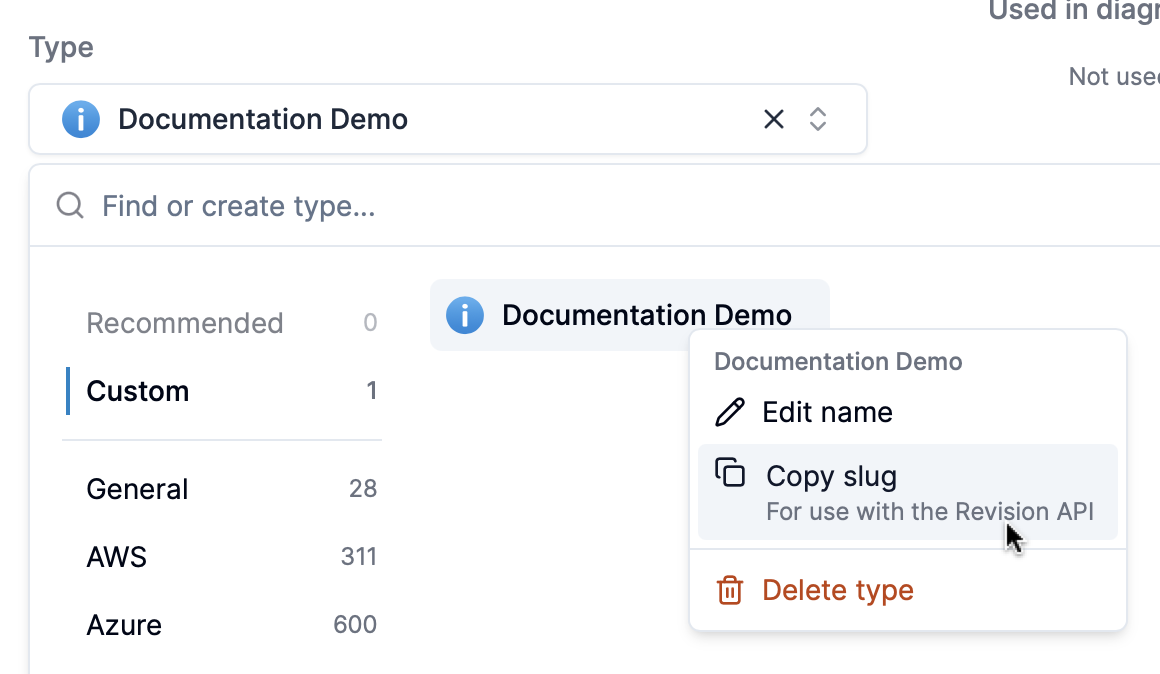
forTypes?: string[] | Optional array of type IDs. Restricts this attribute to only components of the specified types. |
You can find type IDs by right-clicking types in the type selector.
Examples
Creating a new attribute
curl -X POST https://your-workspace.revision.app/api/external/attributes \
  -H "Content-Type: application/json" \
  -H "Authorization: Bearer your-api-key-here" \
  -d '{
    "name": "Environment",
    "desc": "Deployment environment for the component",
    "type": "LIST",
    "list": ["Development", "Staging", "Production"],
    "required": true
  }'
Getting an attribute by ID
curl -X GET https://your-workspace.revision.app/api/external/attributes/5cW9LmzRZcu \
  -H "Authorization: Bearer a0e08cad-184b-48a4-miku-14776a549b79"
Updating an existing attribute
curl -X PATCH https://your-workspace.revision.app/api/external/attributes/5cW9LmzRZcu \
  -H "Content-Type: application/json" \
  -H "Authorization: Bearer your-api-key-here" \
  -d '{
    "name": "Updated Environment",
    "desc": "Enhanced environment attribute with more options",
    "type": "LIST",
    "list": ["Dev", "Test", "Staging", "Prod", "DR"],
    "required": false
  }'
Upserting batch attributes
curl -X PATCH https://your-workspace.revision.app/api/external/attributes/upsert-batch \
  -H "Content-Type: application/json" \
  -H "Authorization: Bearer your-api-key-here" \
  -d '[
    {
      "name": "Environment",
      "type": "LIST",
      "list": ["Production", "Staging", "Development"],
      "required": true
    },
    {
      "id": "5cW9LmzRZcu",
      "name": "Updated Demo",
      "type": "LIST",
      "list": ["First", "Second", "Third"]
    }
  ]'